macOS
Know your rank.
Own the chart.
AppRankHero tracks your App Store and Google Play keywords every day, on a Mac app that feels like it belongs there. Signed and notarized by Apple.
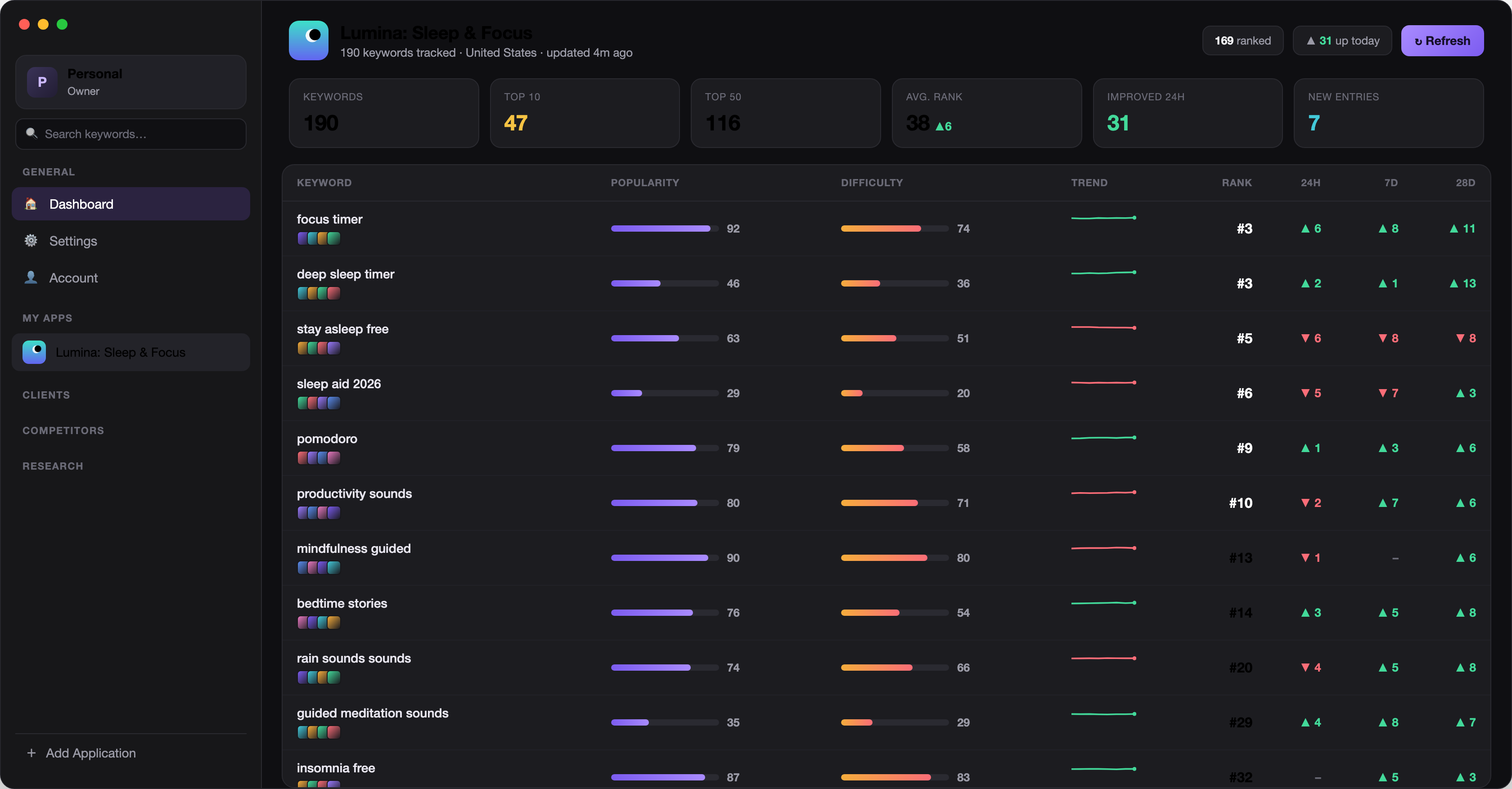
Every rank.
Every morning.
AppRankHero scans the store results for each of your keywords, every day, on the App Store and on Google Play. Ranks, movements, competitors. All of it lands in one table before your first coffee.
Built to see the whole board.
Rank tracking, research and competitive intelligence. Native on your Mac.
Scanned daily. Both stores.
Every App Store keyword gets a full top‑200 scan each day, every Google Play keyword the top‑30 results that Google Play search returns. You see the exact position, and exactly how it moved.
Research that tells the truth.
Popularity and difficulty for any keyword you consider. Chase terms you can actually win.
Know the competition by name.
Full competitor fields for every keyword. Who holds each spot, and what they rank with.
Every country that matters.
Track the same keywords across multiple App Store and Google Play countries. Rankings differ. Now you see where.
Progress you can count.
Watch your top‑10 count climb, week after week.
keywords, up from 31 last month
AppRankHero Pro
It works while you sleep.
The free app refreshes while it is open on your Mac. Pro moves the work to our servers. Rankings refresh every morning, even when your Mac is closed, asleep, or in a bag.
Pro: 10 apps, 10,000 keywords. Studio: 50 apps, 100,000 keywords.
Ask your AI. It knows your charts.
Pro and Studio include an MCP server. Connect ChatGPT, Claude, Codex, Cursor or any MCP client to your ranking data and ask in plain language. Your license key is the only credential you need.
https://apprankhero.com/mcp
-
Sign in with your license key
In ChatGPT, Claude and Perplexity, add a custom connector with this URL. An AppRankHero page opens, paste your license key there.
-
Or send it as a header
Claude Code, Codex, Cursor, VS Code, Gemini CLI and Windsurf send it from their config:
Authorization: Bearer ARH-XXXX -
Reads and writes
Your AI can list apps, keywords, ranks, history, competitors and reports, search the App Store and Google Play, add apps, and track or untrack keywords.
Requires Pro or Studio. To disconnect, remove the connector or the config entry in your AI tool.
Connect your tool.
Pick your app. Replace ARH-XXXX with your license key.
ChatGPT
Sign in with license key- In ChatGPT, open Settings, then Apps (Connectors on some plans).
- Under Advanced settings, turn on Developer mode, then choose Create.
- Name it AppRankHero, paste the URL and set Authentication to OAuth.
- Connect. An AppRankHero page opens, paste your license key there.
Needs a plan with developer mode: Plus, Pro, Business or Enterprise. Menu names may vary slightly.
https://apprankhero.com/mcpClaude
Sign in with license key- Open Settings (Customize in newer versions), then Connectors.
- Choose Add custom connector and paste the URL.
- Click Connect. An AppRankHero page opens, paste your license key there.
Works on claude.ai and in Claude Desktop. The Free plan allows one custom connector. On Team and Enterprise, an owner adds it in Organization settings.
https://apprankhero.com/mcpClaude Code
License key header- Run the command in your terminal, with your license key in place of
ARH-XXXX. --scope usermakes AppRankHero available in every project.- Start Claude Code and run
/mcpto check the connection.
claude mcp add --transport http apprankhero \
  https://apprankhero.com/mcp --scope user \
  --header "Authorization: Bearer ARH-XXXX"
Codex
License key header- Add the server block to
~/.codex/config.toml. - Export your license key as
ARH_TOKEN. Add the line to~/.zshrcso it stays. - Restart Codex. Prefer one command?
codex mcp addwrites the same entry.
The same config covers the Codex CLI, the Codex IDE extension and the ChatGPT desktop app.
[mcp_servers.apprankhero]
url = "https://apprankhero.com/mcp"
bearer_token_env_var = "ARH_TOKEN"export ARH_TOKEN=ARH-XXXXcodex mcp add apprankhero --url https://apprankhero.com/mcp \
--bearer-token-env-var ARH_TOKENCursor
License key header- Open
~/.cursor/mcp.json, or create it. - Add the
apprankheroentry with your license key. - Save. AppRankHero shows up in Cursor Settings under MCP.
For a single project, put the same file at .cursor/mcp.json in the project folder.
{
  "mcpServers": {
    "apprankhero": {
      "url": "https://apprankhero.com/mcp",
      "headers": {
        "Authorization": "Bearer ARH-XXXX"
      }
    }
  }
}
VS Code
License key header- Create
.vscode/mcp.jsonin your project, or run MCP: Open User Configuration to add it everywhere. - Paste the config. VS Code asks for your license key once and stores it securely.
- Open Copilot Chat in Agent mode and enable the AppRankHero tools.
{
  "inputs": [
    {
      "type": "promptString",
      "id": "arh-token",
      "description": "AppRankHero license key",
      "password": true
    }
  ],
  "servers": {
    "apprankhero": {
      "type": "http",
      "url": "https://apprankhero.com/mcp",
      "headers": {
        "Authorization": "Bearer ${input:arh-token}"
      }
    }
  }
}
Gemini CLI
License key header- Run the command with your license key in place of
ARH-XXXX. - Or add the same entry to
~/.gemini/settings.jsonby hand. - Start Gemini CLI and run
/mcpto see the AppRankHero tools.
gemini mcp add --transport http -s user \
  -H "Authorization: Bearer ARH-XXXX" \
apprankhero https://apprankhero.com/mcp{
"mcpServers": {
"apprankhero": {
"httpUrl": "https://apprankhero.com/mcp",
"headers": {
"Authorization": "Bearer ARH-XXXX"
}
}
}
}Windsurf
License key header- Open
~/.codeium/windsurf/mcp_config.json. - Add the
apprankheroentry with your license key. - Save, then refresh the MCP servers in Cascade.
Newer installs keep this file at ~/.config/devin/mcp_config.json.
{
  "mcpServers": {
    "apprankhero": {
      "serverUrl": "https://apprankhero.com/mcp",
      "headers": {
        "Authorization": "Bearer ARH-XXXX"
      }
    }
  }
}
Any other MCP client
Header or sign in- Add a remote server with the URL and the Streamable HTTP transport.
- Send your license key as
Authorization: Bearer ARH-XXXX, or choose OAuth and sign in with it. - Ask your AI to list your apps to check the connection.
Zed, Cline, LM Studio, Perplexity and Raycast work the same way.
URL        https://apprankhero.com/mcp
Transport  Streamable HTTP
Header     Authorization: Bearer ARH-XXXX
Start free. Stay as long as you like.
The free app is genuinely useful. Pro is for when one app stops being enough, Studio for when you run a portfolio.
For your first app.
No card required.
- 1 app
- 500 keywords
- Daily rank scans: top‑200 on the App Store, top‑30 on Google Play
- Keyword research and competitors
- Refreshes while the app is open on your Mac
macOS 13 or later. Notarized by Apple.
For indie developers and growing portfolios.
billed annually. $49.99/year
- 10 apps
- 10,000 keywords
- Server engine. Refreshes every morning, even while your Mac sleeps
- MCP server for ChatGPT, Claude and other AI tools
- Email and Slack rank reports
Cancel anytime.
For studios and agencies.
billed annually. $124.99/year
- 50 apps
- 100,000 keywords
- Everything in Pro: server engine, MCP server, email and Slack reports
- Room for client and portfolio apps, with team roles
- Priority refresh
Cancel anytime.
Your license key appears right after checkout and we email it to you, it is also in your Polar customer portal. Paste it in the app (Account, Upgrade) or use it for the MCP server.
Your rank is moving.
See where.
Download AppRankHero and know where you stand by tomorrow morning.
Notarized by Apple·Free to start·No card required